 Handbook
Home Page Table of Contents
Handbook
Home Page Table of Contents
Handbook
Home Page Table of Contents
 Previous Section (Keyboard and Mouse Ports)
  Next Section (Disk Drive Interfaces)
 Previous Chapter (Chassis Tour)
  Next Chapter (Software Tools)
Only one parallel port has been available for SGI systems as a built-in port. It has been built into all the systems since the Personal IRIS. The connector used is a 25 Pin Sub-D (DB-25).
There are three possible modes the this port can support:
This is a standard centronics type parallel port. It can be used to support a parallel interface printer. It is unidirectional in its data flow. This is the same style of parallel port as used on the PC compatible type platforms. In fact, parallel printer cables used on PC compatibles (with one end having a DB-25 connector, the other with a "Centronics" style 36 pin connector) work perfectly for connecting printers to the SGI systems.
This port mode supports bidirectional transfers. It was designed to support a particular Ricoh parallel port scanner. This scanner is does not conform to any other parallel port standard.
This port mode supports bidirectional transfers according to the Boise interface specification. However, the hardware was designed before the Boise spec was complete and approved. It has also not been fully tested with a "Boise Compatible" device.
One other parallel port has been available from SGI as an optional port. This was a VME add-in board that supported the Versatec plotter.
The table below shows the parallel ports and modes available by platform:
Table 4-17 Parallel Ports on SGI Systems
Click here for a PostScript version of this table
----------------------------------------------------------------------------------
Chassis Built In Parallel Port Ikon
Versatec
Parallel Port
(option only)
STDPP SGIPP BOISEPP
(Unidirectional) (Bidirectional) (Boise Interface)
A built-in parallel port has been included with every system designed since the Personal IRIS.
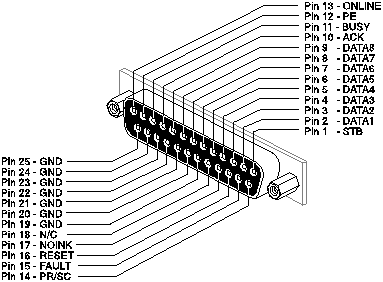
Figure 4-16 DB-25 Parallel Port Connector
Click here for a PostScript version of Figure 4-16
The three possible modes the port can support have different names for certain signals. These signals will be defined here.
Table 4-18 Built-In Parallel Port Pinout
Click here for a PostScript version
of this table
-------------------------------------------------------------------------------------------------
| STDPP | SGIPP (Ricoh) | BOISEPP
Pin Signal | Description I/O | Signal Description I/O | Signal Description I/O
Name | | Name | Name
This board was made by Ikon Corporation as an OEM product for SGI. It is no longer sold as an SGI product. It is known as the Ikon board. It's interface is a 37 Pin Sub-D (DB-37). This board actually has two outputs. One is for the Versatec, the other is a standard Centronics printer output. However, the Centronics output was never supported by software.
Since this is a 6U VME board, it was put in a 6U to 9U adapter for placement in the Twin Tower, Diehard or Predator series chassis. For these systems an I/O Panel with a DB-37 connector was installed on the I/O Panel. It could also be placed directly into a Personal IRIS. For these systems a version of the board with a sheetmetal extension was available, again with a DB-37 connection.
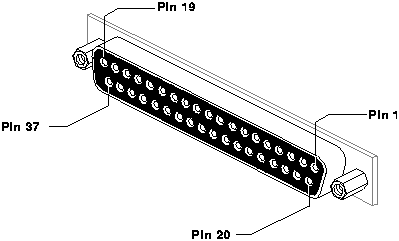
Figure 4-17 DB-37 Ikon Parallel Port Connector
Click here for a PostScript version
of Figure 4-17
Table 4-19 Ikon Parallel Port Pinout
Click here for a PostScript version
of this table
------------------------------------------------
Pin Signal Name Description Input/
Output
Handbook
Home Page Table of Contents
Previous Section (Keyboard and Mouse Ports) Next Section (Disk Drive Interfaces)
Previous Chapter (Chassis Tour) Next Chapter (Software Tools)