 Handbook
Home Page Table of Contents
Handbook
Home Page Table of Contents
Handbook
Home Page Table of Contents
 Previous Section (Serial Ports)
  Next Section (Parallel Ports)
 Previous Chapter (Chassis Tour)
  Next Chapter (Software Tools)
Some styles of keyboards can be used on systems other than the ones they were originally shipped on. For this reason, this section identifies the keyboard and/or mouse system connection separately from any connections on the keyboard itself.
Keyboard and mouse connections to the system are either through a combined keyboard/mouse interface, or through PS/2 style keyboard and mouse interfaces, which are carried on separate cables. The connectors used are either a 15 pin D (DB-15), a 9 pin D (DB-9), a 6 pin mini-DIN or a PS/2 style 6 pin mini-DIN. The table below defines which chassis have which types of interfaces.
Table 4-9 Keyboard & Mouse System Connections on SGI Platforms
Click here for a PostScript version of this table
------------------------------------------------------------------------------
Chassis Model | Combined Keyboard & Mouse | Separate
Type |--------------------------------| Keyboard &
| | Mouse
| 15 Pin 9 Pin 6 Pin | PS/2 Style
| (DB-15) (DB-9) Mini-DIN | (6 Pin
| | Mini-DIN)
The table below shows the supply voltage(s) and logic levels for the keyboard and mouse as well as the type of interface each device has.
Table 4-10 Keyboard & Mouse Voltages and Interfaces
Click here for a PostScript version of this table
----------------------------------------------------------------------------
Interface Platform Supply Logic Levels Interface
Voltage Mark/Space
There are four styles of keyboards for the system.
4D Style - This keyboard has a captive cable with a DB-15 connector for the system. This keyboard has a DB-9 connector on each side of the keyboard for the mouse connection. This is the keyboard used from the inception of the 4D series up until the Diehard2 platform. The mouse intended for this keyboard was an optical mouse.
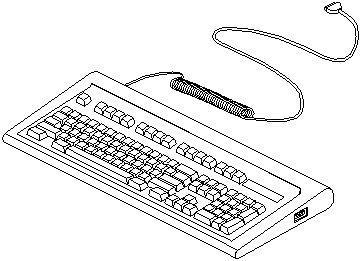
Figure 4-6 4D Style Keyboard
Click here for a PostScript version of Figure 4-6
Personal IRIS Style - This keyboard has two DB-9 connectors. One is used for connecting to the system while the other is used to connect the mouse. This keyboard originally shipped first with the Personal IRIS. The mouse shipped with this keyboard was an optical mouse.
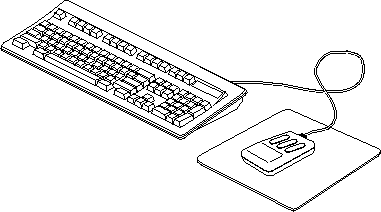
Figure 4-7 Personal IRIS Style Keyboard and Mouse
Click here for a PostScript version of Figure 4-7
Indigo Style - This keyboard has two 6 pin mini-DIN connectors. One is used for connecting to the system while the other is used to connect the mouse. The two connectors are wired identically. The mouse originally shipped with the Indigo was a mechanical mouse. With the appropriate cable (DB-9 to 6 pin mini-DIN) this keyboard can be used on an older style Personal IRIS. Starting with the Eveready/Terminator chassis this style of keyboard was shipped with the high-end systems.
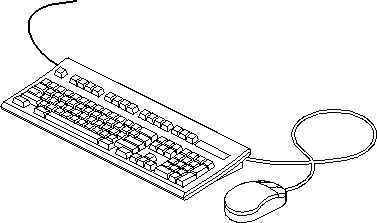
Figure 4-8 Indigo Style Keyboard & Mouse
Click here for a PostScript version of Figure 4-8
PS/2 Style - This keyboard style has a captive cable for connecting to the system. There are no connectors available on this keyboard for connecting the mouse. This keyboard was originally shipped with the Indigo2 and Indy.
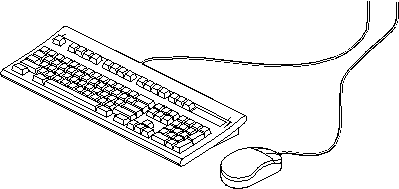
Figure 4-9 PS/2 Style Keyboard & Mouse
Click here for a PostScript version of Figure 4-9
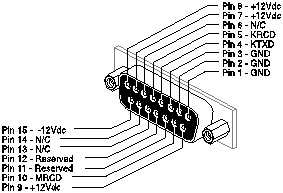
Figure 4-10 DB-15 Keyboard/Mouse Connector
Click here for a PostScript version of Figure 4-10
Table 4-11 DB-15 Keyboard/Mouse System Connector Pinout
Click here for a PostScript version of this table
---------------------------------------------------------- Pin Signal Name Description Input/Output---------------------------------------------------------- 1 GND Ground - 2 GND Ground - 3 GND Ground - 4 KTXD Keyboard Transmit Data Output 5 KRCD Keyboard Receive Data Input 6 N/C No Connection - 7 +12Vdc Power Output 8 +12Vdc Power Output 9 +12Vdc Power Output 10 MRCD Mouse Transmit Data Input 11 RES Reserved - 12 RES Reserved - 13 N/C No Connection - 14 N/C No Connection - 15 -12Vdc Power Output ----------------------------------------------------------
1. Maximum current draw on the +12 Vdc lines is 1 amp.
2. Maximum current draw on the -12 Vdc line is 1 amp.
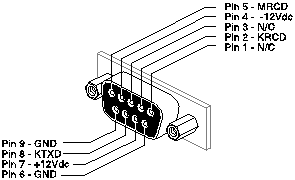
Figure 4-11 DB-9 Keyboard/Mouse Connector
Click here for a PostScript version of Figure 4-11
Table 4-12 DB-9 Keyboard/Mouse System Connector Pinout
Click here for a PostScript version of this table
--------------------------------------------------------- Pin Signal Name Description Input/Output--------------------------------------------------------- 1 N/C No Connection - 2 KRCD Keyboard Receive Data Input 3 N/C No Connection - 4 -12 Vdc Power Output 5 MRCD Mouse Receive Data Input 6 GND Ground - 7 +12 Vdc Power Output 8 KTXD Keyboard Transmit Data Output 9 GND Ground - ---------------------------------------------------------
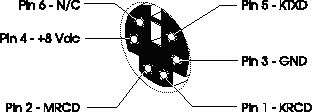
Figure 4-12 6 Pin Mini-DIN Keyboard/Mouse Connector
Click here for a PostScript version of Figure 4-12
Table 4-13 6 Pin Mini-DIN Keyboard/Mouse System Connector Pinout
Click here for a PostScript version of this table
------------------------------------------------------------ Pin Signal Name Description Input/Output------------------------------------------------------------ 1 KRCD Keyboard Receive Input 2 MRCD Mouse Receive Input 3 GND Ground - 4 +5/8/12 Vdc Power Output (1 Amp Max) 5 KTXD Keyboard Transmit Output 6 N/C No Connection - ------------------------------------------------------------
1. Consult Table 4-10 to determine the supplied voltage.
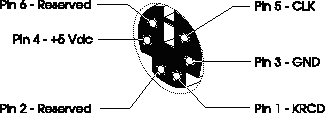
Figure 4-13 PS/2 Keyboard Connector
Click here for a PostScript version of Figure 4-13
Table 4-14 6 Pin Mini-DIN Keyboard System Connector Pinout
Click here for a PostScript version of this table
-------------------------------------------------------- Pin Signal Name Description Input/Output-------------------------------------------------------- 1 KRCD Keyboard Receive Input 2 Reserved - 3 GND Ground Output 4 +5 Vdc Power Output (1 Amp Max) 5 CLK Keyboard Clock Output 6 Reserved - --------------------------------------------------------
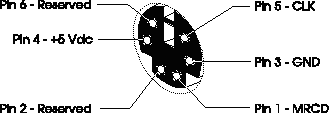
Figure 4-14 PS/2 Mouse Connector
Click here for a PostScript version of Figure 4-14
Table 4-15 6 Pin Mini-DIN Mouse System Connector Pinout
Click here for a PostScript version of this table
----------------------------------------------------- Pin Signal Name Description Input/Output----------------------------------------------------- 1 MRCD Mouse Receive Input 2 - Reserved - 3 GND Ground Output 4 +5 Vdc Power Output (1 Amp Max) 5 CLK Mouse Clock Output 6 - Reserved - -----------------------------------------------------
This mouse is not a device that sends its information in the form of a serial stream of data including the codes for button presses. This mouse connection was part of the custom keyboard used for the original 4D series of systems.
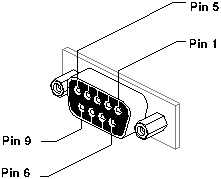
Figure 4-15 DB-9 Mouse Connector
Click here for a PostScript version of Figure 4-15
Table 4-16 DB-9 Mouse System Connector Pinout (4D Keyboard)
Click here for a PostScript version of this table
-------------------------------------------------- Pin Signal Name Description Input/Output-------------------------------------------------- 1 VCC +12 Volts - 2 XA Input 3 XB or -5V Input/- 4 YA Input 5 YB or MTXD Input 6 Left Button Input 7 Middle Button Input 8 Right Button Input 9 GND Ground - --------------------------------------------------
Handbook
Home Page Table of Contents
Previous Section (Serial Ports) Next Section (Parallel Ports)
Previous Chapter (Chassis Tour) Next Chapter (Software Tools)