 Handbook
Home Page Table of Contents
Handbook
Home Page Table of Contents
Handbook
Home Page Table of Contents
 No Previous Section
  Next Section (Keyboard and Mouse Ports)
 Previous Chapter (Chassis Tour)
  Next Chapter (Software Tools)
There are three main varieties of serial ports for Silicon Graphics systems. They are the 9 pin "D" (EIA-232), the 9 pin "D" (EIA-422) and the 8 pin Mini-DIN (EIA-232/EIA-422). The number and type of ports found on various platforms are found in the table below.
Table 4-1 Serial Port Types on SGI Platforms
Click here for a PostScript version of this table
---------------------------------------------------------------------------------------
Chassis Model 9 Pin 9 Pin 8 Pin 8 Pin DIN 4 Pin
Type (DB-9) (DB-9) Mini-DIN Powered Mini-DIN
EIA-232 EIA-422 Peripheral Power
Port Port
1. Available only as an option taking up one I/O Panel space
2. Available as an option only for the TFLU type chassis.
3. Minimum 8 serial ports available for 4 CPU systems (240, 340, 440), 16 ports available for 8 CPU systems (280, 380, 480).
Some systems also included a connection known as a "powered peripheral port". This ports purpose is to provide power to external devices such as Spaceball and the StereoView emitter. The 8 pin DIN connection also provides a sync signal used by the StereoView emitter for switching between eyes. The 4 pin Mini-DIN connection only provides power for external connections, no actual serial port signals are available.
SGI also offers options to expand the number of available serial ports. These take the form of add-in VME cards with either 6 or 32 ports per added board. For those systems in the Twin Tower and Single Tower chassis with more than one CPU board, four serial ports are added with each CPU, up to a maximum of 16.
Serial ports are access by using the device file /dev/ttyxnn, where x is the type of connection desired, and nn is the number of the serial port. SGI systems provide three types of serial port connections.
A ttydnn (where nn is the port number) device is used for simple serial connections that do not require hardware flow control. An example would be terminals or tablet type devices.
A ttymnn device is used for devices that require modem control signals.
A ttyfnn device is used for devices that understand hardware flow control signals.
The serial man page contains more detailed information about serial port usage.
The table below defines the input and output voltage levels for the various serial port implementations.
Table 4-2 Serial Port I/O Voltage Levels
Click here for a PostScript version of this table
---------------------------------------------------
Protocol Platform I/O Voltages
Mark Space
On the Indigo specifically, it is possible that the control signals could drop below the acceptable "legal" limits.
The maximum data transfer rate for all EIA-232 and EIA-423 serial ports is 38,400 Baud. For the EIA-422 ports the maximum data transfer rate is 38,400 Baud.
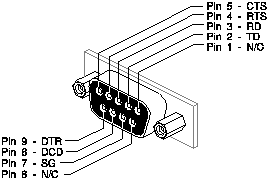
Figure 4-1 DB-9, EIA-232 Serial Port Connector
Click here for a PostScript version of Figure 4-1
Table 4-3 9 Pin EIA-232 Pinout
Click here for a PostScript version of this table
------------------------------------- Pin Signal Name Description------------------------------------- 1 N/C No Connection 2 TD Transmit Data 3 RD Receive Data 4 RTS Request To Send 5 CTS Clear To Send 6 N/C No Connection 7 SG Signal Ground 8 DCD Data Carrier Detect 9 DTR Data Terminal Ready -------------------------------------
While the 9 Pin serial port has the same number of pins as found on IBM PC AT the pinouts are different. Also, the PC style connector is a male connector while the SGI port uses a female connector. This means that cables and adapters for the IBM PC will not work with the SGI DB-9.
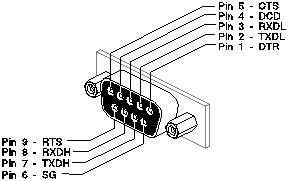
Figure 4-2 DB-9, EIA-422 Serial Port Connector
Click here for a PostScript version of Figure 4-2
Table 4-4 9 Pin EIA-422 Serial Port Pinout
Click here for a PostScript version of this table
----------------------------------------- Pin Signal Name Description----------------------------------------- 1 DTR Data Terminal Ready 2 TXDL Transmit Data Low 3 RXDL Receive Data Low 4 DCD Data Carrier Detect 5 CTS Clear To Send 6 SG Signal Ground 7 TXDH Transmit Data High 8 RXDH Receive Data High 9 RTS Request To Send -----------------------------------------
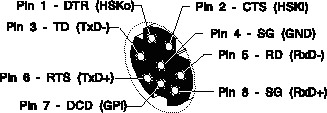
Figure 4-3 8 Pin Mini-DIN Serial Port Connector
Click here for a PostScript version of Figure 4-3
(EIA-423 Mode)
Table 4-5 8 Pin Mini-DIN EIA-232 Serial Port Pinout
Click here for a PostScript version of this table
-------------------------------------
Pin Signal Description
Name
(EIA-422 Mode)
Table 4-6 8 Pin Mini-DIN EIA-422 Serial Port Pinout
Click here for a PostScript version of this table
---------------------------------------
Pin Signal Description
Name
1. Switching between EIA-423 and EIA-422 modes is accomplished by using a streams ioctl. Consult the serial man page for more information.
This port was not originally built into the Twin Tower chassis. Two ports were added on a separate I/O panel as an option. Starting with the Single Tower (Diehard) chassis, the high-end systems were designed to incorporate two of these ports.
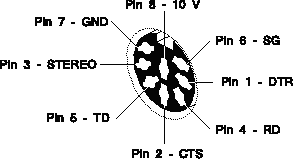
Figure 4-4 8 Pin DIN Powered Peripheral Port Connector
Click here for a PostScript version of Figure 4-4
Table 4-7 8 Pin DIN Powered Peripheral Port Pinout
Click here for a PostScript version of this table
----------------------------------------- Pin Signal Name Description----------------------------------------- 1 DTR Data Terminal Ready 2 CTS Clear To Send 3 STEREO Stereo Field Sync 4 RD Receive Data 5 TD Transmit Data 6 SG Signal Ground 7 GND Ground Point 8 V10P 10 Volt Supply (max 500 mA) -----------------------------------------
1. This port only operates in EIA-232 mode.
2. The ground point is provided as a chassis ground primarily for EMI considerations.
3. On those systems with this port, the available Powered Peripheral Ports share the signal lines with tty2, tty3, and tty4 (if applicable), the regular 9 Pin ports. This implies that if the 9 pin serial port is in use, the Powered Peripheral Port may not be used.
While these ports are not strictly serial ports, they are typically used in conjunction with the serial ports on a Personal IRIS. There are two connections. One supplies + 5 Vdc, the other supplies +12 Vdc. Typically a "Y" cable is used to connect this port and a regular serial port to a serial device that requires power. A small I/O panel with two of these ports is available as an option on most of the Personal IRIS chassis. Early chassis did not have the opening in the chassis for this I/O panel. With the TFLU chassis the space for these connectors became standard.
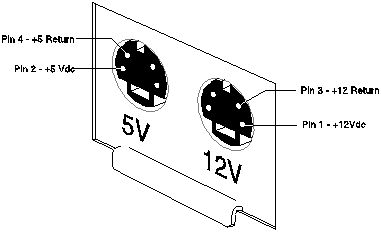
Figure 4-5 4 Pin Mini-DIN Power Port Connectors
Click here for a PostScript version of Figure 4-5
Table 4-8 4 Pin Mini-DIN Power Port Pinout
Click here for a PostScript version of this table
---------------------------------------------------------- Type Pin Signal Name Description---------------------------------------------------------- 1 N/C No Connection +5 Vdc 2 +5 + 5 Volts dc (1A max) Connection 3 N/C No Connection 4 5VRTN + 5 Volt Return 1 +12 +12 Volts dc (0.5A max) +12 Vdc 2 N/C No Connection Connection 3 12RTN + 12 Volt Return 4 N/C No Connection ----------------------------------------------------------
Handbook
Home Page Table of Contents
No Previous Section Next Section (Keyboard and Mouse Ports)
Previous Chapter (Chassis Tour) Next Chapter (Software Tools)