 Handbook
Home Page Table of Contents
Handbook
Home Page Table of Contents
Handbook
Home Page Table of Contents
 Previous Section (Parallel Ports)
  Next Section (Monitors)
 Previous Chapter (Chassis Tour)
  Next Chapter (Software Tools)
Silicon Graphics systems have continued to keep pace with the advances in disk technology. This results in support of a number of different disk drive interfaces over the history of the IRIS product line. While the SCSI bus has evolved into a bus used for more than just disk drives, an important use in SGI platforms is support of the hard disk(s). Therefore, it is covered in this section rather than in a section dedicated to general SCSI peripherals.
The table below shows the disk drive interfaces supported on the various platforms as shipped. A table entry that is lightly shaded denotes where a disk interface could be added to the platform as an upgrade. Darker shading denotes the interface is not available for that chassis. For additional explanation and notes on this table, consult the following page.
Table 4-20 Disk Drive Interfaces on SGI Systems
Click here for a PostScript version of this table
---------------------------------------------------------------------------------------------
Chassis | ESDI SMD IPI | SCSI-1 | SCSI-2
| | Single Differ | Narrow, Wide, Narrow, Wide,
| | -ended -ential | Single Single Diff. Diff.
| | | -ended -ended
[1] The 3201 controller could control 2 ESDI disks, the later 4201 controller was faster and could
control up to 4 ESDI disks.
[2] Drives can be configured as either single ended or differential depending on the adapter at the rear of the drive sled.
[3] The Power Center Server in the Predator Rack could contain 2 IO3's resulting in 4 available SCSI buses.
[4] Differential SCSI-2 drives controlled by the "Jaguar" or "Cougar" controller board.
Numbers in table entries indicate maximum number of controllers and maximum number of disk drives per controller separated by a "/". For example, where two controllers each controlling 4 drives is possible, the entry would be "2/4". The total number of drives possible may exceed the number of drive bays or modules available in a chassis or the drives may not physically fit in a chassis. In cases such as these (for example, SMD drives on a Twin Tower chassis) external drive bays or racks are assumed.
Each type of disk interface operates over a bus with a limited maximum length. Beyond that length disk accesses are error prone and could cause significant system problems. The table below shows the maximum length allowed for the disk interfaces documented here.
Table 4-21 Maximum Bus Length for Disk Interfaces
Click here for a PostScript version of this table
---------------------------------------
Interface Single Ended/ Maximum
Differential Bus Length
Each chassis uses a certain amount of the maximum bus length for connecting disk (or other devices) inside the chassis. This amount of cabling must be taken into account when attaching disks external to the system chassis. The total length of internal and external cabling must not exceed the maximum bus length as shown in the table above. Table 4-22, " Internal Chassis Bus Lengths" shows the lengths of cable used internally on the various chassis.
Table 4-22 Internal Chassis Bus Lengths
Click here for a PostScript version of this table
--------------------------------------------------------------------------------------------- Chassis | ESDI SMD IPI SCSI-1 SCSI-2--------------------------------------------------------------------------------------------- Twin Tower | 6 ft. (1.82 m) 1.5 ft. 1.5 ft. 3.28 ft. (1 m) + 12 Slot | + 2 ft. (0.6 m) (0.45 m) (0.45 m) 1.64 ft. (0.5 m) | for each drive for each drive | module module | Twin Tower | 6 ft. (1.82 m) 1.5 ft. 1.5 ft. 3.28 ft. (1 m) + 15 Slot | + 2 ft. (0.6 m) (0.45 m) (0.45 m) 1.64 ft. (0.5 m) | for each drive for each drive | module module | Diehard | 1.5 ft. 1.5 ft. 7 ft. (2.13 m) | (0.45 m) (0.45 m) | Predator | 1.5 ft. 1.5 ft. | (0.45 m) (0.45 m) | Diehard2 | 1.5 ft. 1.5 ft. Ch 0: 8 ft. (2.43 m) | (0.45 m) (0.45 m) Ch 1: 6 ft. (1.82 m) | Eveready | 3 ft. (0.91 m) Deskside | | Terminator | 3 ft. (0.91 m) Rack | | Personal IRIS| 3.9 ft. (1.2 m) | Indigo (R3K)| 1.3 ft. (0.4 m) | Indigo (R4K)| 1.3 ft. (0.4 m) | Indigo2 | 1.3 ft. (0.4 m) | Indy | 1.3 ft. (0.4 m) ---------------------------------------------------------------------------------------------
For proper operation, the disk interfaces must have the appropriate termination at the end of the bus. For ESDI, SMD and IPI these terminations are made at the last drive of the chain, usually by plugging in a termination pack into a connector on the disk drive itself.
For SCSI, termination is typically done via a separate terminator assembly. Systems shipped with SCSI-1 capability were equipped with a passive terminator for attaching to the end of the SCSI bus (the SCSI bus connector as shipped from the factory). Starting with the systems that shipped with SCSI-2 buses, the systems were equipped with active terminators. Given the higher speed of the SCSI-2 bus, the active termination is required. Using passive termination on SCSI-2 systems may cause disk problems.
It cannot be overemphasized how important termination is for proper system operation. Many customer problems result from missing or improper termination.
ESDI drives were used primarily on the early Twin Tower chassis. The drive modules that stacked on top of the power supply tower had connectors on the back of the module that connected the drive to the controller. The controller connected to the drives via I/O panel assemblies and external cables.
A drive module would have three connectors on the back. One would be the DB-25 for data to that specific drive, the other two would be DB-37's which connected to the drive and allowed for connection of a "daisy chain" cable to the next drive module. The drawing below shows such a panel.
Although it is possible to support ESDI drives and controllers on platforms in later products, it was replaced rapidly by SCSI as the default disk interface.
The ESDI interface consists of two separate connectors. One is a 37 pin Sub-D (DB-37) that carries control signals to all the drives connected to one controller. The other is a 25 pin Sub-D (DB-25) that carries data to one specific drive. The actual ESDI interface is via a 34 and 20 pin flat cable, but for ease of external connection, the DB-37 and DB-25 connectors were used.
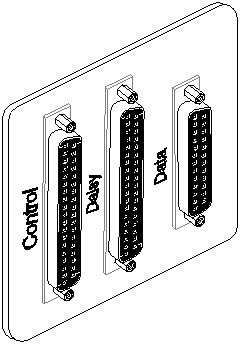
Figure 4-18 ESDI Drive Module Plate
Click here for a PostScript version of Figure 4-18
Table 4-23 EDSI Control Cable Pinout
Click here for a PostScript version of this table
----------------------------------------------------------------- Signal Name Description Signal Pin Ground Pin----------------------------------------------------------------- Reduced WC Flag 2 1 Head Select 2 4 3 Write Gate 6 5 Seek Complete 8 7 Track 0 10 9 Write Fault 12 11 Head Select 0 14 13 Sector/Address Mark Found 16 15 Head Select 1 18 17 Index 20 19 Ready 22 21 Step 24 23 Drive Select 1 26 25 Drive Select 2 28 27 Drive Select 3 30 29 Drive Select 4 32 31 Direction 43 33 No Connection 35, 36, 37 -----------------------------------------------------------------
Table 4-24 ESDI Data Cable Pinout
Click here for a PostScript version of this table
----------------------------------------------------------- Signal Name Description Signal Pin Ground Pin----------------------------------------------------------- Drive Selected 1 2 Reserved 3 4 Reserved 5 6 ? 7 8 Reserved 9 Reserved 10 11 + Write Data 13 12 - Write Data 14 15 + Read Data 17 16 - Read Data 18 19, 20 No Connection 21, 22, 23, 24, 25 -----------------------------------------------------------
Like ESDI, SMD disks require two cables - one control cable that connects to all the drives and one data cable for each drive. Both the control and data connectors are 62 pin "D" connectors (DB62). The I/O plate with the control connector is marked "Control" while the data connector I/O panel will be marked "Disk 0", "Disk 1", "Disk 2" or "Disk 3".
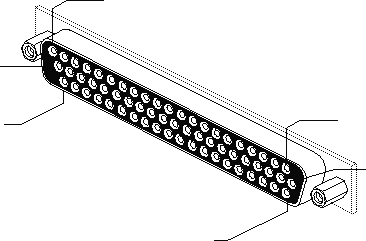
Figure 4-19 SMD Connector
Click here for a PostScript version of Figure 4-19
Table 4-25 SMD Data Connector Pinout
Click here for a PostScript version of this table
--------------------------------------------------------
Signal Name Description Signal Pin Signal Pin
(Low) (High)
Table 4-26 SMD Control Connector Pinout
Click here for a PostScript version of this table
--------------------------------------------------
Signal Name Description Signal Pin Signal Pin
(Low) (High)
The IPI controller has two ports. Each port can control four drives. The single, 50 conductor cable carries the signals to all the drives. A daisy chain cable connects the drive signals from one drive to the next. This is typically done internal to the drive chassis or drive tray. Pinout for this connection is on the following page.
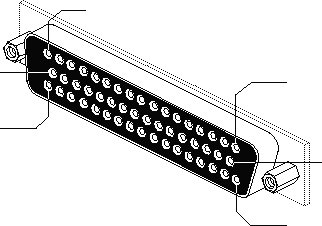
Figure 4-20 IPI Connector
Click here for a PostScript version of Figure 4-20
Table 4-27 IPI Disk Interface Pinout (3 Row DB-50)
Click here for a PostScript version of this table
-------------------------------------------------- Signal Description Signal Pin Signal Pin Name (Low) (High)-------------------------------------------------- ATTN Attention 4 20 SYO 25 41 SLI 23 39 SYI 48 15 MO 29 45 SEL0 27 43 BB0 16 32 BB1 33 49 BB2 36 3 BB3 40 7 BB4 8 24 BB5 42 9 BB6 2 18 BB7 19 36 BBP 50 17 BA0 46 13 BA1 14 30 BA2 6 22 BA3 10 26 BA4 44 11 BA5 12 28 BA6 21 37 BA7 38 5 BAP 31 47 GND Ground 1,34 --------------------------------------------------
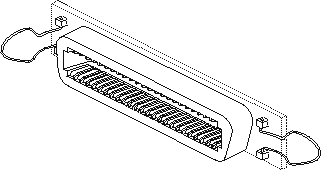
Figure 4-21 SCSI-I (Centronics) Connector
Click here for a PostScript version of Figure 4-21
Termination is typically done via a separate terminator assembly. This assembly usually is placed on the external SCSI connector.
Systems shipped with SCSI-1 capability were equipped with a passive terminator for attaching to the end of the SCSI bus (the SCSI bus connector as shipped from the factory).
Starting with the systems that shipped with SCSI-2 buses, the systems were equipped with active terminators. Given the higher speed of the SCSI-2 bus, the active termination is required. Using passive termination on SCSI-2 systems may cause disk problems.
It cannot be overemphasized how important termination is for proper system operation. Many customer problems result from missing or improper termination.
Table 4-28 SCSI-1 (Centronics) Connector Pinout
Click here for a PostScript version of this table
---------------------------------------------------------------
Signal Name Description Signal Pin Ground
Pin
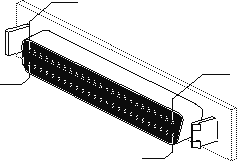
Figure 4-22 SCSI-2 (Narrow) High Density Connector
Click here for a PostScript version of Figure 4-22
The pinout for the SCSI-2 High Density connection is the same as for the SCSI-1 (Centronics) connection. Consult Table 4-28, for that pinout.
Termination is typically done via a separate terminator assembly. This assembly usually is placed on the external SCSI connector.
Systems shipped with SCSI-1 capability were equipped with a passive terminator for attaching to the end of the SCSI bus (the SCSI bus connector as shipped from the factory).
Starting with the systems that shipped with SCSI-2 buses, the systems were equipped with active terminators. Given the higher speed of the SCSI-2 bus, the active termination is required. Using passive termination on SCSI-2 systems may cause disk problems.
It cannot be overemphasized how important termination is for proper system operation. Many customer problems result from missing or improper termination.
Both the single ended and differential types of SCSI-2 connections use the same 68 pin connector. The pinouts are slightly different. The tables that follow show the pinouts for each type of connection.
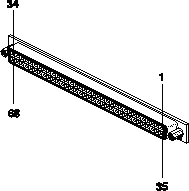
Figure 4-23 SCSI-2 (Wide) Hi Density Connector
Click here for a PostScript version of Figure 4-23
Table 4-29 SCSI-2 Wide, Single Ended Connector Pinout
Click here for a PostScript version of this table
------------------------------------------------------------------------- Pin Signal Name Description Pin Signal Name Description------------------------------------------------------------------------- 1 GND Ground 35 -DB(12) Data Bit 12 2 GND Ground 36 -DB(13) Data Bit 13 3 GND Ground 37 -DB(14) Data Bit 14 4 GND Ground 36 -DB(15) Data Bit 15 5 GND Ground 39 -DB(P1) Data Parity Bit 1 6 GND Ground 40 -DB(0) Data Bit 0 7 GND Ground 41 -DB(1) Data Bit 1 8 GND Ground 42 -DB(2) Data Bit 2 9 GND Ground 43 -DB(3) Data Bit 3 10 GND Ground 44 -DB(4) Data Bit 4 11 GND Ground 45 -DB(5) Data Bit 5 12 GND Ground 46 -DB(6) Data Bit 6 13 GND Ground 47 -DB(7) Data Bit 7 14 GND Ground 48 -DB(P) Data Parity Bit 0 15 GND Ground 49 GND Ground 16 GND Ground 50 GND Ground 17 TERMPWR Terminator Power 51 TERMPWR Terminator Power 18 TERMPWR Terminator Power 52 TERMPWR Terminator Power 19 RESERVED Reserved 53 RESERVED Reserved 20 GND Ground 54 GND Ground 21 GND Ground 55 -ATN Attention 22 GND Ground 56 GND Ground 23 GND Ground 57 -BSY Busy 24 GND Ground 58 -ACK Acknowledge 25 GND Ground 59 -RST Reset 26 GND Ground 60 -MSG Message 27 GND Ground 61 -SEL Select 28 GND Ground 62 -C/D Control/Data 29 GND Ground 63 -REQ Request 30 GND Ground 64 -I/O Input/Output 31 GND Ground 65 -DB(8) Data Bit 8 32 GND Ground 66 -DB(9) Data Bit 9 33 GND Ground 67 -DB(10) Data Bit 10 34 GND Ground 68 -DB(11) Data Bit 11 -------------------------------------------------------------------------
Table 4-30 SCSI-2 Wide, Differential Connector Pinout
Click here for a PostScript version of this table
--------------------------------------------------------------------------- Pin Signal Name Description Pin Signal Name Description--------------------------------------------------------------------------- 1 +DB(12) Data Bit 12 35 -DB(12) Data Bit 12 2 +DB(13) Data Bit 13 36 -DB(13) Data Bit 13 3 +DB(14) Data Bit 14 37 -DB(14) Data Bit 14 4 +DB(15) Data Bit 15 38 -DB(15) Data Bit 15 5 +DB(P1) Data Parity Bit 1 39 -DB(P1) Data Parity Bit 1 6 GND Ground 40 GND Ground 7 +DB(0) Data Bit 0 41 -DB(0) Data Bit 0 8 +DB(1) Data Bit 1 42 -DB(1) Data Bit 1 9 +DB(2) Data Bit 2 43 -DB(2) Data Bit 2 10 +DB(3) Data Bit 3 44 -DB(3) Data Bit 3 11 +DB(4) Data Bit 4 45 -DB(4) Data Bit 4 12 +DB(5) Data Bit 5 46 -DB(5) Data Bit 5 13 +DB(6) Data Bit 6 47 -DB(6) Data Bit 6 14 +DB(7) Data Bit 7 48 -DB(7) Data Bit 7 15 +DB(P) Data Parity Bit 0 49 -DB(P) Data Parity Bit 0 16 DIFFSENS DIfferential Sense 50 GND Ground 17 TERMPWR Terminator Power 51 TERMPWR Terminator Power 18 TERMPWR Terminator Power 52 TERMPWR Terminator Power 19 RESERVED Reserved 53 RESERVED Reserved 20 +ATN Attention 54 -ATN Attention 21 GND Ground 55 GND Ground 22 +BSY Busy 56 -BSY Busy 23 +ACK Acknowledge 57 -ACK Acknowledge 24 +RST Reset 58 -RST Reset 25 +MSG Message 59 -MSG Message 26 +SEL Select 60 -SEL Select 27 +C/D Control/Data 61 -C/D Control/Data 28 +REQ Request 62 -REQ Request 29 +I/O Input/Output 63 -I/O Input/Output 30 GND Ground 64 GND Ground 31 +DB(8) Data Bit 8 65 -DB(8) Data Bit 8 32 +DB(9) Data Bit 9 66 -DB(9) Data Bit 9 33 +DB(10) Data Bit 10 67 -DB(10) Data Bit 10 34 +DB(11) Data Bit 11 68 -DB(11) Data Bit 11 ---------------------------------------------------------------------------
Handbook
Home Page Table of Contents
Previous Section (Parallel Ports) Next Section (Monitors)
Previous Chapter (Chassis Tour) Next Chapter (Software Tools)