 Handbook Home Page
Table of Contents
Handbook Home Page
Table of Contents
Handbook Home Page
Table of Contents
 Previous Chapter(Introduction)
  Next Chapter(Chassis Tour)
Silicon Graphics has become known for using bold colors. Knowing how to decipher these colors and other markings on the IRIS systems can assist in determining the hardware present in the system.
The early IRIS systems used the color of the top hat to indicate the type of graphics subsystem that is in the machine. The drawing below depicts the Twin & Single Tower type chassis and the location of the top hats and doors that reflect the graphics subsystem. The table shows the correlation of the color and the graphics subsystem.
For all these systems the skins were "brown" (actually, the real name of the color is "dark warm grey", but nobody thinks that's what it looks like).
In addition to the colored top hats, there are normally labels along the front of the top hat that described the systems configuration at shipment.
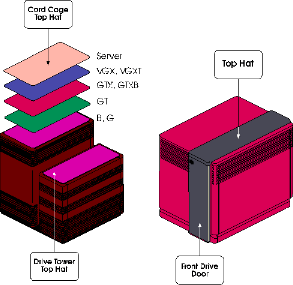
Figure 2-1 Twin and Single Tower Top Hats and Doors
Click here for a PostScript version of Figure 2-1
Table 2-1 Twin Tower Top Hat Colors
Click here for a PostScript version of this table
-------------------
Color Graphics
Subsystem
The Predator Rack did not have any skins or parts that were colored that would give away the type of (or lack of) graphics subsystem. The area at the top of the bottom door (where the CPU status panel is) would either have the nomenclature "Power Series", "Power Center" or "Skywriter".
The Power Series racks had either GTX, GTXB, VGX, VGXT or RE graphics. The Power Center racks had no graphics. The Skywriter is a dual pipe graphics rack where the graphics subsystem could be either VGX, VGXT or RE.
The skins for all these systems were "brown" like the Twin and Single Tower systems.
The Personal IRIS systems did not have any colored parts that would indicate the kind of a graphics or processor system was in the machine. The skins are "brown".
The TFLU chassis has an additional line on the front of the system which gives away the presence of the door for the front loading disk drive. Other than this minor difference there is no difference in coloring or marking.
The Crimson chassis had only one color combination. The skins are bright red while the top hat and front drive door are a dark grey. The marking "IRIS Crimson" is across the front of the system.
The Indigo is best known for its namesake color. Sometimes refered to as "purple boxes". From a marking point of view, the drive door has the word "Elan" on it if the system is equipped with that set of graphics. Likewise, the door would have "XS", "XS24", or "XZ" if it had those graphics subsystems. If the Indigo is a server (i.e. no graphics), it would have the words "Data Station" on the drive door.
Once the R4000 CPU was released, badges were used to differentiate between R3000 based systems and R4000 based systems. These badges (shown below) denoted both the CPU and the graphics subsystem installed. The table following shows the relationship between the badge type and the color of plastic it was molded in
.
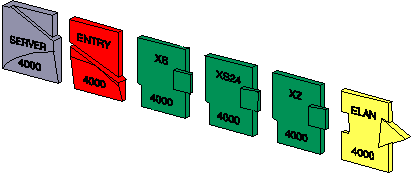
Figure 2-2 Indigo R4000 Badges
Click here for a PostScript version of Figure 2-2
Table 2-2 Indigo Badges
Click here for a PostScript version of this table
---------------------------------------
Badge Badge Plastic Color
The Indigo2 chassis skins are "green". There are three badges that denote the type of graphics subsystem (shown below) and one that denotes the use of the R8000 processor. The table following shows the relationship between the graphics system and/or CPU, the badge and the color of plastic used to mold the badge. The "Power" badge can be added to any of the graphics badges.
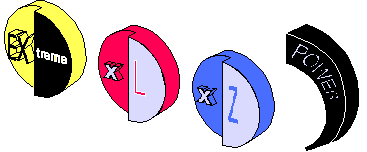
Figure 2-3 Indigo2 Badges
Click here for a PostScript version of Figure 2-3
Table 2-3 Indigo2 Badges
Click here for a PostScript version of this table
----------------------------------
Graphics/CPU Badge Plastic Color/
Paint Color
The Onyx and Challenge systems share the two types of chassis - deskside and rack.
For Onyx, the skins are black. The top hat and front drive door of the deskside machine are a deep purple. For the rack, the area surrounding the system status display has a purple marble-like overlay with the marking "Onyx" in white.
For the Challenge deskside systems the skins are a black. The top hat and front drive door for the deskside systems are a blue-grey. On the rack the skins are the blue-grey while the area surrounding the system status display is a blue and black marbled overlay with the marking "Challenge" in gold. >
The Indy skin is a "granitized" blue color.
Handbook Home PageTable of Contents
Previous Chapter(Introduction) Next Chapter(Chassis Tour)